First, the new billing process is faster; instead of waiting until the 5th of the month for your reservation data to be available for your review you're now able to review on the 1st day of the month.
You'll still receive an alert when your reservation data is ready for review.
Once your reservation data is ready, the updated interface is subtly different than the spreadsheet you've been utilizing.
First, your reservation data is available within your portal within the Billing>Reservations section: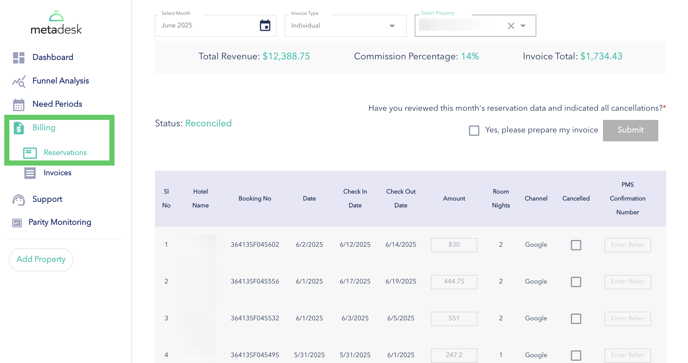
From here, you're able to review reservations that took place the month prior like you normally do. One updated feature is you're able to adjust the revenue amount for reservations that have changed since the initial booking - typically this is due to either an increase or increase in total days.
Once youv'e adjusted the reservation amount, be sure to click the green check mark on the far right of the reservation to save that reservations updated amount: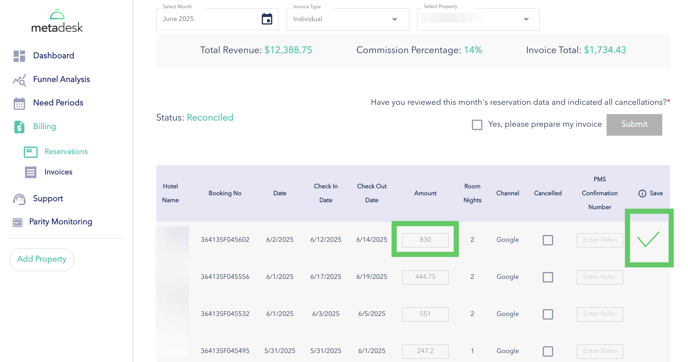
Next, you'll indicate cancellations by checking the box in the "Cancelled" column and entering a PMS confirmation for those reservations that have canceled:
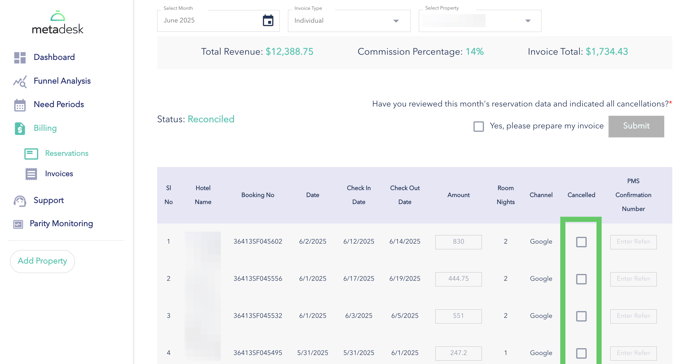
Once you've adjusted all necessary reservation amounts and indicated all cancelled reservations, simply check the box at the top, "Yes, please prepare my invoice" and click "Submit". An invoice will be sent to you immediately. 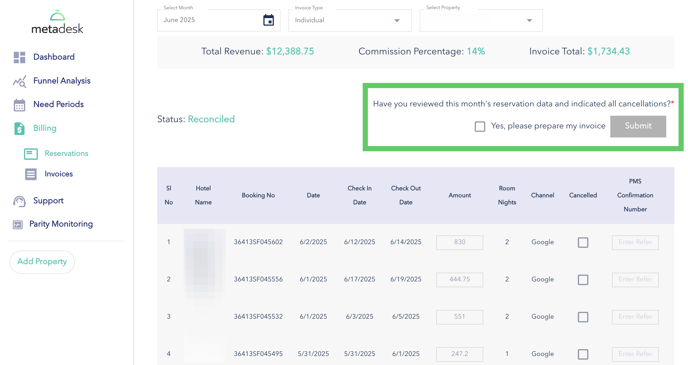
Please note, if you choose not to reconcile, your invoice will be sent on the 10th of the month and include all billable reservations.
Have questions? We're standing by ready to help at Support@Metadesk.pro